
TickTick:To Do List & Calendar
TickTick LimitedProductivity
4.68.01K Reviews
- Version
- Varies With Device
- Installs
- 10.00M
- Age Rating
- Everyone
Screenshots
Our Review of TickTick:To Do List & Calendar
 Analysis by Appyee
I get the most out of a to-do app when it supports a routine I can keep up, rather than becoming another place to manage. TickTick: To Do List & Calendar combines task lists, calendar planning, and reminders, so I can collect what needs doing and then decide when it fits. It’s a practical approach for busy days, though it works best when I take a little time to shape the system around my habits.
Start with a workflow, not a pile of tasks
Before adding everything I can think of, I find it helpful to decide what belongs in a task list and what belongs on the calendar. A task is something I need to do; a calendar entry is a commitment tied to a time. Keeping that distinction clear makes the combined view useful instead of crowded. I can capture a job quickly, then schedule it only when I know when it realistically fits.
That small habit matters because a list can look manageable while the day is already full of appointments. Seeing tasks beside calendar commitments helps me notice the difference between having a free-looking afternoon and actually having time for focused work. I’d recommend starting with a few lists—such as work, home, and errands—rather than building an elaborate system on day one.
First Impressions and Interface
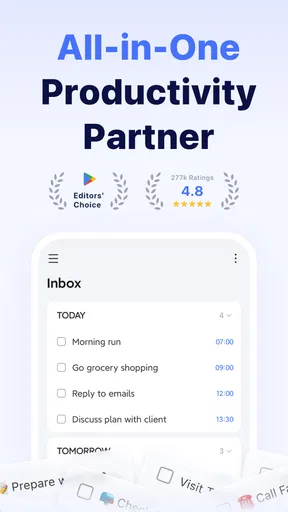
The first thing that struck me about TickTick is its clean and intuitive interface. The app feels inviting, not overwhelming, which is crucial when you're already dealing with a hectic schedule. Setting it up is a breeze; it guides you through the process without a fuss. You can quickly start adding tasks, deadlines, and reminders.
One cool feature is the customizable themes. I love a bit of personalization, and being able to tweak the look to match my mood or style was a nice touch. The app doesn't just look good; it functions smoothly with minimal lag, which is a big win in my book.
Capture first, organize with intention
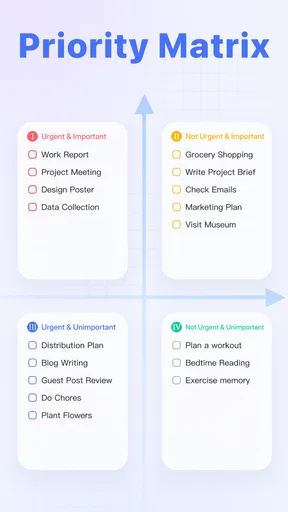
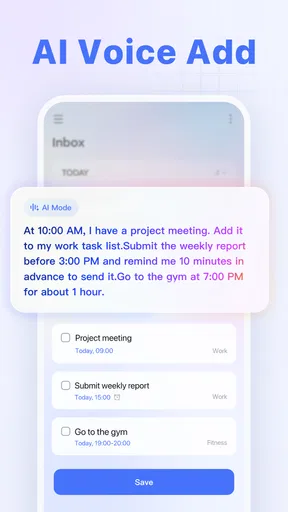
At its core, TickTick is all about task management. Adding a task is as simple as tapping a button, and you can dive into details by setting priorities, adding tags, or even subtasks. This feature is golden for breaking down big projects into manageable chunks. I found myself using the voice input quite a bit when I was on the go – it's surprisingly accurate!
A useful way to handle a larger job is to make the next visible action a task and keep the remaining steps as subtasks. For example, “prepare for a presentation” is vague enough to invite procrastination; gathering notes, drafting an outline, and checking the slides are easier to act on. I also try not to assign a due date to every thought. Dates should signal a genuine deadline or planned work session, not simply make the list look organized.
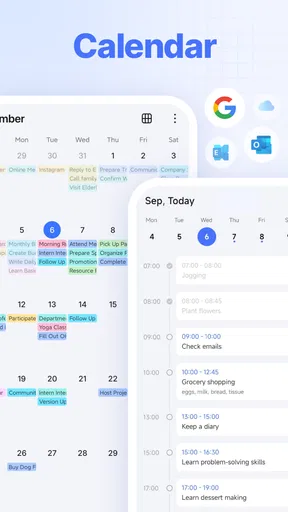
The calendar integration is seamless. I could easily sync it with my existing Google Calendar, ensuring that all my appointments and tasks were in one place. This integration means no more double booking or missing important meetings.
For everyday planning, I like using the calendar to spot where a task can fit, while leaving flexible jobs on a list until I have a realistic opening. This is a helpful distinction for people whose work changes during the day: a fixed appointment stays fixed, but an errand can move without turning into a crisis. If a calendar view starts to feel packed, I’d move less urgent work back to the list instead of pretending every item has a precise time slot.
Make routines repeatable, not demanding
Reminders are the lifeblood of any productivity app, and TickTick doesn’t disappoint. You can set multiple reminders for each task, which is a lifesaver for someone like me who needs a few nudges to stay on track. The notifications are timely and unobtrusive, and I appreciate that I can customize their frequency.
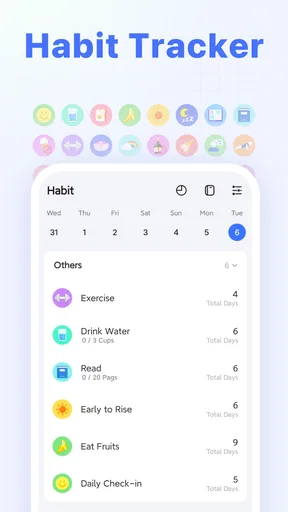
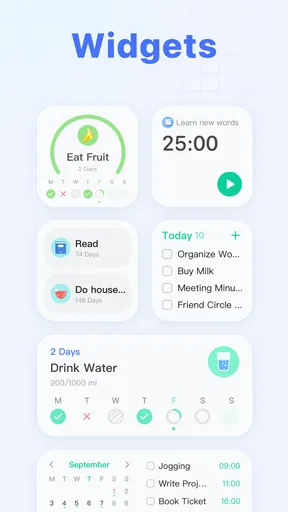
There's also a unique feature called "Habit Tracker," which encourages you to build new habits by tracking your progress over time. It’s like having a personal coach in your pocket, cheering you on to reach your goals. I found it motivating, especially when trying to establish a new routine.
I’d keep habit tracking modest at first. A routine such as preparing lunch for the next day or taking a short walk is easier to maintain when it has a clear cue and doesn’t compete with a long list of ambitions. A task list is useful for one-off actions; a habit tracker makes more sense for something I want to repeat. Treating every personal goal as both a task and a habit can create duplicate reminders, so I’d choose one home for each item.
A realistic weekday might begin with a quick capture of a work request, a reminder to pick up groceries, and a fixed appointment already visible in the calendar. I can break the work request into a first step, leave the errand flexible, and set a reminder only if I’m likely to forget it. At the end of the day, a brief review lets me move unfinished work forward instead of letting old dates silently define tomorrow’s priorities.
Sharing helps, but agree on the process
For those working in teams or managing family schedules, the collaboration features are a game changer. You can share lists or tasks with others, making it easy to stay on the same page. I tried this with my team at work, and it significantly improved our coordination on projects.
You can assign tasks to specific people, add comments, and even upload attachments. The app makes sure everyone is updated in real-time, so there's no room for miscommunication. It’s a solid tool for both personal and professional life.
Shared lists are most useful when everyone agrees what a task means and who is responsible for the next move. A household list, for instance, can prevent one person from carrying every reminder in their head. For a complicated project, though, a dedicated project-management service may be a better fit if the team needs extensive planning and reporting. I see TickTick’s sharing as a convenient layer for coordinating actions, not a substitute for every team process.
Where the system can become noisy
The main friction I watch for is over-organization. Priorities, tags, subtasks, reminders, calendar entries, and habits each have a purpose, but using all of them on every item adds upkeep. If I spend more time sorting tasks than doing them, I pare the setup back: keep a few clear lists, use deadlines selectively, and reserve reminders for things that genuinely need a prompt.
Notifications also need judgment. Multiple nudges can help with an important appointment or a time-sensitive errand, but too many quickly become background noise. I’d begin with the reminder that matters most, then add another only when experience shows the first one is not enough. The goal is to make alerts trustworthy, so I don’t start dismissing them automatically.
TickTick is a productivity app from TickTick Limited, and it is free to start using. Its average rating is 4.6 from around 157,000 ratings, with over 5 million installs. It is rated for Everyone and includes in-app purchases, so users can begin without paying and consider an upgrade if the extra tools suit their routine.
Is the paid tier useful for your way of working?
While the free version of TickTick is robust, I decided to try out the premium features. The upgrade offers additional perks like calendar views, customizable filters, and even more reminders per task. If you're a power user, it's worth considering, but the free version is more than adequate for everyday use.
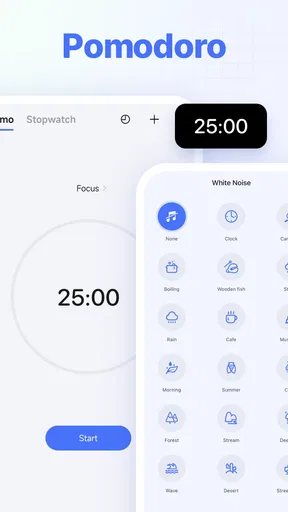
One premium feature that stood out to me is the "Pomo Timer." It’s based on the Pomodoro Technique, helping you work in focused bursts with breaks in between. As someone who struggles with procrastination, this feature helped me boost my productivity.
I’d judge an upgrade by a real recurring need, not by the length of the feature list. If I regularly rely on more detailed calendar planning, filters, or extra reminders, paying may make sense; if I mainly capture errands and a few deadlines, the free option can be enough. The listed in-app purchase prices range from $0.99 to $35.99 per item, so I’d check the available purchase details in the app before deciding which option, if any, is worthwhile.
How it compares with simpler alternatives
Compared with a basic checklist app, TickTick brings calendar planning, reminders, habits, and shared tasks into the same workflow. That can reduce the need to jump between separate tools, especially if I want a task list to sit alongside appointments. The trade-off is that a minimalist list app may feel faster if all I need is a handful of checkboxes and I don’t want to configure anything.
It also sits between a personal planner and a full project-management workspace. For an individual, family, or small group coordinating everyday actions, its combination feels approachable. For a team that needs complex dependencies, formal project reporting, or extensive oversight, I’d look at a more specialized work platform. The right choice depends less on which app has more features and more on how much structure I will actually maintain.
TickTick has been available since June 19, 2013, and that long-running focus on task organization shows in the range of ways it can support a routine. Still, no app can decide what deserves attention. I find it most useful when I review the list regularly, remove stale tasks, and make the next action obvious rather than treating the app as a place to store every worry.
Final Verdict
Overall, TickTick: To Do List & Calendar is a fantastic app for anyone looking to organize their life better. It's user-friendly, feature-rich, and flexible enough to cater to various needs. Whether you're a student, a professional, or just someone trying to keep track of daily tasks, TickTick has something for you.
I’d recommend it to someone who wants tasks, schedules, and repeatable habits to work together, and who is willing to spend a little time keeping the setup tidy. I’d skip it if I wanted only a bare-bones checklist, or if a team needed a deeper project-control system. Its strongest benefit is not simply collecting more tasks; it is helping me turn an overloaded day into a few clear next steps.
With its combination of intuitive design, powerful features, and seamless integration, it's no wonder it's a favorite among productivity enthusiasts. Give it a try, and you might just find it becomes your go-to app for staying on top of everything life throws your way. Download it today and start ticking off those tasks!
Verdict
Strengths of TickTick:To Do List & Calendar
- User-friendly interface with intuitive navigation.
- Seamlessly integrates with multiple calendars.
- Customizable task categories and tags.
- Offers a Pomodoro timer for productivity.
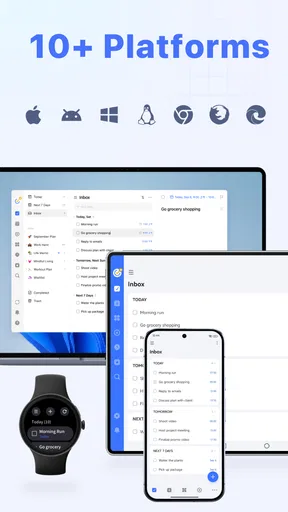
- Cross-platform sync ensures data consistency.
Limitations of TickTick:To Do List & Calendar
- Limited features in the free version.
- No offline access for free users.
- Occasional sync delays with certain devices.
- Premium subscription can be pricey.
- Interface can feel cluttered with many tasks.
Similar Picks in This Category
View All
Google Calendar
Google LLC4.6

Google Drive
Google LLC4.3

Google Assistant
Google LLC3.9

Microsoft OneDrive
Microsoft Corporation4.6

Samsung Calendar
Samsung Electronics Co., Ltd.4.1

Microsoft OneNote: Save Notes
Microsoft Corporation4.6
Frequently Asked Questions
What platforms is TickTick available on?
TickTick is available on multiple platforms including Android, iOS, macOS, Windows, and as a web app. This cross-platform availability ensures seamless synchronization of your tasks and schedules across all your devices, making it convenient to manage your to-do lists and calendar entries from anywhere.
Does TickTick offer a free version?
Yes, TickTick provides a free version with essential features like task creation, scheduling, and basic calendar integration. However, there is a premium version available that unlocks advanced features such as custom smart lists, premium themes, and calendar views, which can enhance productivity and user experience.
Can I integrate TickTick with other apps and services?
TickTick supports integration with various third-party apps and services. Notably, it allows synchronization with calendars such as Google Calendar, which helps in consolidating your schedules. Additionally, TickTick can be integrated with voice assistants and other productivity tools to streamline task management.
How secure is my data on TickTick?
TickTick prioritizes user data security by employing encryption protocols for data transmitted between your device and their servers. While TickTick takes measures to protect user information, it's always advisable to use strong passwords and enable any additional security features offered, such as two-factor authentication, to enhance account security.
What distinguishes TickTick from other to-do list apps?
TickTick stands out with its combination of task management and calendar features, offering a versatile solution for both personal and professional use. The app's intuitive interface, customizable reminders, and the ability to create recurring tasks make it a robust choice for users looking to optimize their productivity. Additionally, the Pomodoro timer and habit-tracking features contribute to its uniqueness.
